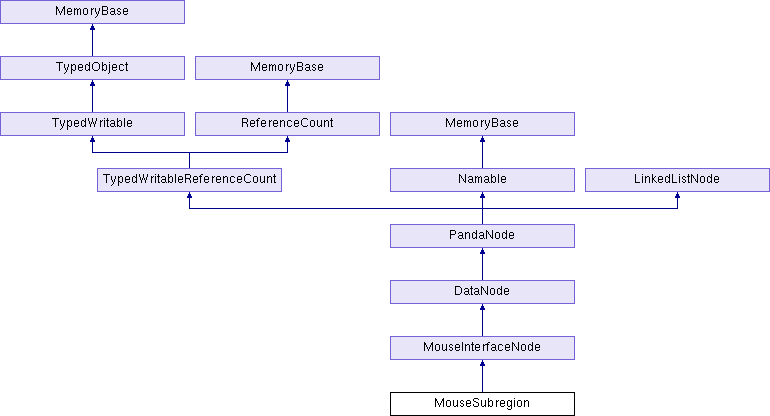
The MouseSubregion object scales the mouse inputs from within a rectangular region of the screen, as if they were the full-screen inputs. More...
#include "mouseSubregion.h"
Public Member Functions | |
| MouseSubregion (const std::string &name) | |
| virtual TypeHandle | force_init_type () |
| PN_stdfloat | get_bottom () const |
| Retrieves the y coordinate of the bottom edge of the rectangle within the window. More... | |
| PN_stdfloat | get_left () const |
| Retrieves the x coordinate of the left edge of the rectangle within the window. More... | |
| PN_stdfloat | get_right () const |
| Retrieves the x coordinate of the right edge of the rectangle within the window. More... | |
| PN_stdfloat | get_top () const |
| Retrieves the y coordinate of the top edge of the rectangle within the window. More... | |
| virtual TypeHandle | get_type () const |
| void | set_dimensions (PN_stdfloat l, PN_stdfloat r, PN_stdfloat b, PN_stdfloat t) |
| Changes the region of the window in which the mouse is considered to be active. More... | |
 Public Member Functions inherited from MouseInterfaceNode Public Member Functions inherited from MouseInterfaceNode | |
| MouseInterfaceNode (const std::string &name) | |
| void | clear_all_buttons () |
| Removes all requirements on buttons set by an earlier call to require_button(). More... | |
| void | clear_button (const ButtonHandle &button) |
| Removes any requirement on the indicated button set by an earlier call to require_button(). More... | |
| void | require_button (const ButtonHandle &button, bool is_down) |
| Indicates that the indicated button must be in the required state (either up or down) in order for this particular MouseInterfaceNode to do anything. More... | |
| Public Member Functions inherited from DataNode | |
| DataNode (const std::string &name) | |
| int | get_num_inputs () const |
| Returns the number of different inputs that have been defined for this node using define_input(). More... | |
| int | get_num_outputs () const |
| Returns the number of different outputs that have been defined for this node using define_output(). More... | |
| virtual PandaNode * | make_copy () const |
| Returns a newly-allocated Node that is a shallow copy of this one. More... | |
| void | transmit_data (DataGraphTraverser *trav, const DataNodeTransmit inputs[], DataNodeTransmit &output) |
| Collects the data from all of the parent nodes and puts it into one DataNodeTransmit object, for processing; calls do_transmit_data() to read all the inputs and put the result into the indicated output. More... | |
| void | write_connections (std::ostream &out) const |
| Writes to the indicated ostream a list of all the connections currently showing between this DataNode and its parent(s). More... | |
| virtual void | write_datagram (BamWriter *manager, Datagram &dg) |
| Writes the contents of this object to the datagram for shipping out to a Bam file. More... | |
| void | write_inputs (std::ostream &out) const |
| Writes to the indicated ostream a list of all the inputs this DataNode might expect to receive. More... | |
| void | write_outputs (std::ostream &out) const |
| Writes to the indicated ostream a list of all the outputs this DataNode might generate. More... | |
| Public Member Functions inherited from PandaNode | |
| PandaNode (const std::string &name) | |
| void | add_child (PandaNode *child_node, int sort=0, Thread *current_thread=Thread::get_current_thread()) |
| virtual void | add_for_draw (CullTraverser *trav, CullTraverserData &data) |
| Adds the node's contents to the CullResult we are building up during the cull traversal, so that it will be drawn at render time. More... | |
| void | add_stashed (PandaNode *child_node, int sort=0, Thread *current_thread=Thread::get_current_thread()) |
| Adds a new child to the node, directly as a stashed child. More... | |
| void | adjust_draw_mask (DrawMask show_mask, DrawMask hide_mask, DrawMask clear_mask) |
| Adjusts the hide/show bits of this particular node. More... | |
| virtual void | apply_attribs_to_vertices (const AccumulatedAttribs &attribs, int attrib_types, GeomTransformer &transformer) |
| Applies whatever attributes are specified in the AccumulatedAttribs object (and by the attrib_types bitmask) to the vertices on this node, if appropriate. More... | |
| virtual Light * | as_light () |
| Cross-casts the node to a Light pointer, if it is one of the four kinds of Light nodes, or returns NULL if it is not. More... | |
| void | clear_attrib (TypeHandle type) |
| void | clear_attrib (int slot) |
| Removes the render attribute of the given type from this node. More... | |
| void | clear_bounds () |
| Reverses the effect of a previous call to set_bounds(), and allows the node's bounding volume to be automatically computed once more based on the contents of the node. More... | |
| void | clear_effect (TypeHandle type) |
| Removes the render effect of the given type from this node. More... | |
| void | clear_effects (Thread *current_thread=Thread::get_current_thread()) |
| void | clear_state (Thread *current_thread=Thread::get_current_thread()) |
| void | clear_tag (const std::string &key, Thread *current_thread=Thread::get_current_thread()) |
| void | clear_transform (Thread *current_thread=Thread::get_current_thread()) |
| void | clear_unexpected_change (unsigned int flags) |
| Sets one or more of the PandaNode::UnexpectedChange bits off, indicating that the corresponding property may once again change on this node. More... | |
| virtual PandaNode * | combine_with (PandaNode *other) |
| Collapses this PandaNode with the other PandaNode, if possible, and returns a pointer to the combined PandaNode, or NULL if the two PandaNodes cannot safely be combined. More... | |
| int | compare_tags (const PandaNode *other) const |
| Returns a number less than 0, 0, or greater than 0, to indicate the similarity of tags between this node and the other one. More... | |
| void | copy_all_properties (PandaNode *other) |
| Copies the TransformState, RenderState, RenderEffects, tags, Python tags, and the show/hide state from the other node onto this one. More... | |
| void | copy_children (PandaNode *other, Thread *current_thread=Thread::get_current_thread()) |
| Makes another instance of all the children of the other node, copying them to this node. More... | |
| void | copy_tags (PandaNode *other) |
| Copies all of the tags stored on the other node onto this node. More... | |
| int | count_num_descendants () const |
| virtual | CPT (TransformState) calc_tight_bounds(LPoint3 &min_point |
| CPT (RenderAttrib) get_attrib(TypeHandle type) const | |
| CPT (RenderAttrib) get_attrib(int slot) const | |
| CPT (RenderEffect) get_effect(TypeHandle type) const | |
| CPT (RenderState) get_state(Thread *current_thread | |
| CPT (RenderEffects) get_effects(Thread *current_thread | |
| CPT (TransformState) get_transform(Thread *current_thread | |
| CPT (TransformState) get_prev_transform(Thread *current_thread | |
| CPT (RenderAttrib) get_off_clip_planes(Thread *current_thread | |
| CPT (BoundingVolume) get_bounds(Thread *current_thread | |
| CPT (BoundingVolume) get_bounds(UpdateSeq &seq | |
| CPT (BoundingVolume) get_internal_bounds(Thread *current_thread | |
| virtual bool | cull_callback (CullTraverser *trav, CullTraverserData &data) |
| virtual PandaNode * | dupe_for_flatten () const |
| This is similar to make_copy(), but it makes a copy for the specific purpose of flatten. More... | |
| int | find_child (PandaNode *node, Thread *current_thread=Thread::get_current_thread()) const |
| Returns the index of the indicated child node, if it is a child, or -1 if it is not. More... | |
| int | find_parent (PandaNode *node, Thread *current_thread=Thread::get_current_thread()) const |
| Returns the index of the indicated parent node, if it is a parent, or -1 if it is not. More... | |
| int | find_stashed (PandaNode *node, Thread *current_thread=Thread::get_current_thread()) const |
| Returns the index of the indicated stashed node, if it is a stashed child, or -1 if it is not. More... | |
| BoundingVolume::BoundsType | get_bounds_type () const |
| PandaNode * | get_child (int n, Thread *current_thread=Thread::get_current_thread()) const |
| int | get_child_sort (int n, Thread *current_thread=Thread::get_current_thread()) const |
| Returns the sort index of the nth child node of this node (that is, the number that was passed to add_child()). More... | |
| Children | get_children (Thread *current_thread=Thread::get_current_thread()) const |
| DrawMask | get_draw_control_mask () const |
| DrawMask | get_draw_show_mask () const |
| int | get_fancy_bits (Thread *current_thread=Thread::get_current_thread()) const |
| Returns the union of all of the enum FancyBits values corresponding to the various "fancy" attributes that are set on the node. More... | |
| virtual int | get_first_visible_child () const |
| Returns the index number of the first visible child of this node, or a number >= get_num_children() if there are no visible children of this node. More... | |
| int | get_internal_vertices (Thread *current_thread=Thread::get_current_thread()) const |
| CollideMask | get_into_collide_mask () const |
| virtual CollideMask | get_legal_collide_mask () const |
| int | get_nested_vertices (Thread *current_thread=Thread::get_current_thread()) const |
| CollideMask | get_net_collide_mask (Thread *current_thread=Thread::get_current_thread()) const |
| Returns the union of all into_collide_mask() values set at CollisionNodes at this level and below. More... | |
| DrawMask | get_net_draw_control_mask () const |
| Returns the set of bits in get_net_draw_show_mask() that have been explicitly set via adjust_draw_mask(), rather than implicitly inherited. More... | |
| DrawMask | get_net_draw_show_mask () const |
| Returns the union of all draw_show_mask values–of renderable nodes only– at this level and below. More... | |
| virtual int | get_next_visible_child (int n) const |
| Returns the index number of the next visible child of this node following the indicated child, or a number >= get_num_children() if there are no more visible children of this node. More... | |
| int | get_num_children (Thread *current_thread=Thread::get_current_thread()) const |
| int | get_num_parents (Thread *current_thread=Thread::get_current_thread()) const |
| int | get_num_stashed (Thread *current_thread=Thread::get_current_thread()) const |
| size_t | get_num_tags () const |
| PandaNode * | get_parent (int n, Thread *current_thread=Thread::get_current_thread()) const |
| Parents | get_parents (Thread *current_thread=Thread::get_current_thread()) const |
| PandaNode * | get_stashed (int n, Thread *current_thread=Thread::get_current_thread()) const |
| Stashed | get_stashed (Thread *current_thread=Thread::get_current_thread()) const |
| int | get_stashed_sort (int n, Thread *current_thread=Thread::get_current_thread()) const |
| Returns the sort index of the nth stashed node of this node (that is, the number that was passed to add_child()). More... | |
| std::string | get_tag (const std::string &key, Thread *current_thread=Thread::get_current_thread()) const |
| std::string | get_tag_key (size_t i) const |
| void | get_tag_keys (vector_string &keys) const |
| Fills the given vector up with the list of tags on this PandaNode. More... | |
| unsigned int | get_unexpected_change (unsigned int flags) const |
| Returns nonzero if any of the bits in the input parameter are set on this node, or zero if none of them are set. More... | |
| virtual int | get_unsafe_to_apply_attribs () const |
| Returns the union of all attributes from SceneGraphReducer::AttribTypes that may not safely be applied to the vertices of this node. More... | |
| virtual int | get_visible_child () const |
| Returns the index number of the currently visible child of this node. More... | |
| bool | has_attrib (TypeHandle type) const |
| bool | has_attrib (int slot) const |
| bool | has_dirty_prev_transform () const |
| bool | has_effect (TypeHandle type) const |
| virtual bool | has_selective_visibility () const |
| Should be overridden by derived classes to return true if this kind of node has some restrictions on the set of children that should be rendered. More... | |
| virtual bool | has_single_child_visibility () const |
| Should be overridden by derived classes to return true if this kind of node has the special property that just one of its children is visible at any given time, and furthermore that the particular visible child can be determined without reference to any external information (such as a camera). More... | |
| bool | has_tag (const std::string &key, Thread *current_thread=Thread::get_current_thread()) const |
| bool | has_tags () const |
| virtual bool | is_ambient_light () const |
| Returns true if this is an AmbientLight, false if it is not a light, or it is some other kind of light. More... | |
| bool | is_bounds_stale () const |
| virtual bool | is_collision_node () const |
| A simple downcast check. More... | |
| bool | is_final (Thread *current_thread=Thread::get_current_thread()) const |
| virtual bool | is_geom_node () const |
| A simple downcast check. More... | |
| virtual bool | is_lod_node () const |
| A simple downcast check. More... | |
| bool | is_overall_hidden () const |
| virtual bool | is_renderable () const |
| Returns true if there is some value to visiting this particular node during the cull traversal for any camera, false otherwise. More... | |
| bool | is_scene_root () const |
| Returns true if this particular node is known to be the render root of some active DisplayRegion associated with the global GraphicsEngine, false otherwise. More... | |
| bool | is_under_scene_root () const |
| Returns true if this particular node is in a live scene graph: that is, it is a child or descendent of a node that is itself a scene root. More... | |
| void | list_tags (std::ostream &out, const std::string &separator="\n") const |
| Writes a list of all the tag keys assigned to the node to the indicated stream. More... | |
| void | ls (std::ostream &out, int indent_level) const |
| void | mark_bounds_stale (Thread *current_thread=Thread::get_current_thread()) const |
| void | mark_internal_bounds_stale (Thread *current_thread=Thread::get_current_thread()) |
| virtual void | output (std::ostream &out) const |
| void | prepare_scene (GraphicsStateGuardianBase *gsg, const RenderState *node_state) |
| virtual bool | preserve_name () const |
| Returns true if the node's name has extrinsic meaning and must be preserved across a flatten operation, false otherwise. More... | |
| PT (PandaNode) copy_subgraph(Thread *current_thread | |
| virtual void | r_prepare_scene (GraphicsStateGuardianBase *gsg, const RenderState *node_state, GeomTransformer &transformer, Thread *current_thread) |
| The recursive implementation of prepare_scene(). More... | |
| void | remove_all_children (Thread *current_thread=Thread::get_current_thread()) |
| Removes all the children from the node at once, including stashed children. More... | |
| void | remove_child (int child_index, Thread *current_thread=Thread::get_current_thread()) |
| Removes the nth child from the node. More... | |
| bool | remove_child (PandaNode *child_node, Thread *current_thread=Thread::get_current_thread()) |
| Removes the indicated child from the node. More... | |
| void | remove_stashed (int child_index, Thread *current_thread=Thread::get_current_thread()) |
| Removes the nth stashed child from the node. More... | |
| bool | replace_child (PandaNode *orig_child, PandaNode *new_child, Thread *current_thread=Thread::get_current_thread()) |
| Searches for the orig_child node in the node's list of children, and replaces it with the new_child instead. More... | |
| void | replace_node (PandaNode *other) |
| Inserts this node into the scene graph in place of the other one, and removes the other node. More... | |
| void | reset_prev_transform (Thread *current_thread=Thread::get_current_thread()) |
| Resets the transform that represents this node's "previous" position to the same as the current transform. More... | |
| virtual bool | safe_to_combine () const |
| Returns true if it is generally safe to combine this particular kind of PandaNode with other kinds of PandaNodes of compatible type, adding children or whatever. More... | |
| virtual bool | safe_to_combine_children () const |
| Returns true if it is generally safe to combine the children of this PandaNode with each other. More... | |
| virtual bool | safe_to_flatten () const |
| Returns true if it is generally safe to flatten out this particular kind of PandaNode by duplicating instances (by calling dupe_for_flatten()), false otherwise (for instance, a Camera cannot be safely flattened, because the Camera pointer itself is meaningful). More... | |
| virtual bool | safe_to_flatten_below () const |
| Returns true if a flatten operation may safely continue past this node, or false if nodes below this node may not be molested. More... | |
| virtual bool | safe_to_modify_transform () const |
| Returns true if it is safe to automatically adjust the transform on this kind of node. More... | |
| virtual bool | safe_to_transform () const |
| Returns true if it is generally safe to transform this particular kind of PandaNode by calling the xform() method, false otherwise. More... | |
| void | set_attrib (const RenderAttrib *attrib, int override=0) |
| Adds the indicated render attribute to the scene graph on this node. More... | |
| void | set_bound (const BoundingVolume *volume) |
| Deprecated. More... | |
| void | set_bounds (const BoundingVolume *volume) |
| Resets the bounding volume so that it is the indicated volume. More... | |
| void | set_bounds_type (BoundingVolume::BoundsType bounds_type) |
| Specifies the desired type of bounding volume that will be created for this node. More... | |
| void | set_effect (const RenderEffect *effect) |
| Adds the indicated render effect to the scene graph on this node. More... | |
| void | set_effects (const RenderEffects *effects, Thread *current_thread=Thread::get_current_thread()) |
| void | set_final (bool flag) |
| void | set_into_collide_mask (CollideMask mask) |
| void | set_overall_hidden (bool overall_hidden) |
| void | set_prev_transform (const TransformState *transform, Thread *current_thread=Thread::get_current_thread()) |
| Sets the transform that represents this node's "previous" position, one frame ago, for the purposes of detecting motion for accurate collision calculations. More... | |
| void | set_state (const RenderState *state, Thread *current_thread=Thread::get_current_thread()) |
| void | set_tag (const std::string &key, const std::string &value, Thread *current_thread=Thread::get_current_thread()) |
| void | set_transform (const TransformState *transform, Thread *current_thread=Thread::get_current_thread()) |
| void | set_unexpected_change (unsigned int flags) |
| Sets one or more of the PandaNode::UnexpectedChange bits on, indicating that the corresponding property should not change again on this node. More... | |
| bool | stash_child (PandaNode *child_node, Thread *current_thread=Thread::get_current_thread()) |
| Stashes the indicated child node. More... | |
| void | stash_child (int child_index, Thread *current_thread=Thread::get_current_thread()) |
| Stashes the indicated child node. More... | |
| void | steal_children (PandaNode *other, Thread *current_thread=Thread::get_current_thread()) |
| Moves all the children from the other node onto this node. More... | |
| bool | unstash_child (PandaNode *child_node, Thread *current_thread=Thread::get_current_thread()) |
| Returns the indicated stashed node to normal child status. More... | |
| void | unstash_child (int stashed_index, Thread *current_thread=Thread::get_current_thread()) |
| Returns the indicated stashed node to normal child status. More... | |
| virtual void | update_bam_nested (BamWriter *manager) |
| Called by the BamWriter when this object has not itself been modified recently, but it should check its nested objects for updates. More... | |
| virtual void | write (std::ostream &out, int indent_level) const |
| void | write_recorder (BamWriter *manager, Datagram &dg) |
| This method is provided for the benefit of classes (like MouseRecorder) that inherit from PandaMode and also RecorderBase. More... | |
| virtual void | xform (const LMatrix4 &mat) |
| Transforms the contents of this PandaNode by the indicated matrix, if it means anything to do so. More... | |
| Public Member Functions inherited from TypedWritableReferenceCount | |
| TypedWritableReferenceCount (const TypedWritableReferenceCount ©) | |
| virtual ReferenceCount * | as_reference_count () |
| Returns the pointer cast to a ReferenceCount pointer, if it is in fact of that type. More... | |
| void | operator= (const TypedWritableReferenceCount ©) |
| Public Member Functions inherited from TypedWritable | |
| TypedWritable (const TypedWritable ©) | |
| virtual int | complete_pointers (TypedWritable **p_list, BamReader *manager) |
| Receives an array of pointers, one for each time manager->read_pointer() was called in fillin(). More... | |
| vector_uchar | encode_to_bam_stream () const |
| Converts the TypedWritable object into a single stream of data using a BamWriter, and returns that data as a bytes object. More... | |
| bool | encode_to_bam_stream (vector_uchar &data, BamWriter *writer=nullptr) const |
| Converts the TypedWritable object into a single stream of data using a BamWriter, and stores that data in the indicated string. More... | |
| virtual void | finalize (BamReader *manager) |
| Called by the BamReader to perform any final actions needed for setting up the object after all objects have been read and all pointers have been completed. More... | |
| UpdateSeq | get_bam_modified () const |
| Returns the current bam_modified counter. More... | |
| void | mark_bam_modified () |
| Increments the bam_modified counter, so that this object will be invalidated and retransmitted on any open bam streams. More... | |
| void | operator= (const TypedWritable ©) |
| virtual bool | require_fully_complete () const |
| Some objects require all of their nested pointers to have been completed before the objects themselves can be completed. More... | |
| Public Member Functions inherited from TypedObject | |
| TypedObject (const TypedObject ©)=default | |
| TypedObject * | as_typed_object () |
| Returns the object, upcast (if necessary) to a TypedObject pointer. More... | |
| const TypedObject * | as_typed_object () const |
| Returns the object, upcast (if necessary) to a TypedObject pointer. More... | |
| int | get_best_parent_from_Set (const std::set< int > &) const |
| int | get_type_index () const |
| Returns the internal index number associated with this object's TypeHandle, a unique number for each different type. More... | |
| bool | is_exact_type (TypeHandle handle) const |
| Returns true if the current object is the indicated type exactly. More... | |
| bool | is_of_type (TypeHandle handle) const |
| Returns true if the current object is or derives from the indicated type. More... | |
| TypedObject & | operator= (const TypedObject ©)=default |
| Public Member Functions inherited from ReferenceCount | |
| int | get_ref_count () const |
| WeakReferenceList * | get_weak_list () const |
| Returns the WeakReferenceList associated with this ReferenceCount object. More... | |
| bool | has_weak_list () const |
| Returns true if this particular ReferenceCount object has a WeakReferenceList created, false otherwise. More... | |
| void | local_object () |
| This function should be called, once, immediately after creating a new instance of some ReferenceCount-derived object on the stack. More... | |
| void | ref () const |
| Explicitly increments the reference count. More... | |
| bool | ref_if_nonzero () const |
| Atomically increases the reference count of this object if it is not zero. More... | |
| bool | test_ref_count_integrity () const |
| Does some easy checks to make sure that the reference count isn't completely bogus. More... | |
| bool | test_ref_count_nonzero () const |
| Does some easy checks to make sure that the reference count isn't zero, or completely bogus. More... | |
| virtual bool | unref () const |
| Explicitly decrements the reference count. More... | |
| WeakReferenceList * | weak_ref () |
| Adds the indicated PointerToVoid as a weak reference to this object. More... | |
| void | weak_unref () |
| Removes the indicated PointerToVoid as a weak reference to this object. More... | |
| Public Member Functions inherited from Namable | |
| Namable (const std::string &initial_name="") | |
| void | clear_name () |
| Resets the Namable's name to empty. More... | |
| const std::string & | get_name () const |
| bool | has_name () const |
| Returns true if the Namable has a nonempty name set, false if the name is empty. More... | |
| void | output (std::ostream &out) const |
| Outputs the Namable. More... | |
| void | set_name (const std::string &name) |
Static Public Member Functions | |
| static TypeHandle | get_class_type () |
| static void | init_type () |
| Static Public Member Functions inherited from MouseInterfaceNode | |
| static TypeHandle | get_class_type () |
| static void | init_type () |
| Static Public Member Functions inherited from DataNode | |
| static TypeHandle | get_class_type () |
| static void | init_type () |
| Static Public Member Functions inherited from PandaNode | |
| static DrawMask | get_all_camera_mask () |
| static TypeHandle | get_class_type () |
| static DrawMask | get_overall_bit () |
| static void | init_type () |
| static | PT (PandaNode) decode_from_bam_stream(vector_uchar data |
| static void | register_with_read_factory () |
| Tells the BamReader how to create objects of type PandaNode. More... | |
| static void | reset_all_prev_transform (Thread *current_thread=Thread::get_current_thread()) |
| Visits all nodes in the world with the _dirty_prev_transform flag–that is, all nodes whose _prev_transform is different from the _transform in pipeline stage 0–and resets the _prev_transform to be the same as _transform. More... | |
| static void | set_scene_root_func (SceneRootFunc *func) |
| This is used by the GraphicsEngine to hook in a pointer to the scene_root_func(), the function to determine whether the node is an active scene root. More... | |
| Static Public Member Functions inherited from TypedWritableReferenceCount | |
| static TypeHandle | get_class_type () |
| static void | init_type () |
| static | PT (TypedWritableReferenceCount) decode_from_bam_stream(vector_uchar data |
| Static Public Member Functions inherited from TypedWritable | |
| static bool | decode_raw_from_bam_stream (TypedWritable *&ptr, ReferenceCount *&ref_ptr, vector_uchar data, BamReader *reader=nullptr) |
| Reads the bytes created by a previous call to encode_to_bam_stream(), and extracts the single object on those bytes. More... | |
| static TypeHandle | get_class_type () |
| static void | init_type () |
| Static Public Member Functions inherited from TypedObject | |
| static TypeHandle | get_class_type () |
| static void | init_type () |
| This function is declared non-inline to work around a compiler bug in g++ 2.96. More... | |
| Static Public Member Functions inherited from ReferenceCount | |
| static TypeHandle | get_class_type () |
| static void | init_type () |
| Static Public Member Functions inherited from Namable | |
| static TypeHandle | get_class_type () |
| static void | init_type () |
Additional Inherited Members | |
| Public Types inherited from PandaNode | |
| enum | FancyBits { FB_transform = 0x0001, FB_state = 0x0002, FB_effects = 0x0004, FB_tag = 0x0010, FB_draw_mask = 0x0020, FB_cull_callback = 0x0040 } |
| typedef bool | SceneRootFunc(const PandaNode *) |
| enum | UnexpectedChange { UC_parents = 0x001, UC_children = 0x002, UC_transform = 0x004, UC_state = 0x008, UC_draw_mask = 0x010 } |
| Public Attributes inherited from PandaNode | |
| clear_tag | |
| Removes the value defined for this key on this particular node. More... | |
| virtual LPoint3 bool const TransformState Thread * | current_thread = Thread::get_current_thread()) const |
| Thread * | current_thread = Thread::get_current_thread()) const |
| virtual LPoint3 bool & | found_any |
| get_all_camera_mask | |
| Returns a DrawMask that is appropriate for rendering to all cameras. More... | |
| get_bounds_type | |
| Returns the bounding volume type set with set_bounds_type(). More... | |
| get_child | |
| Returns the nth child node of this node. More... | |
| get_children | |
| Returns an object that can be used to walk through the list of children of the node. More... | |
| get_draw_control_mask | |
| Returns the set of bits in draw_show_mask that are considered meaningful. More... | |
| get_draw_show_mask | |
| Returns the hide/show bits of this particular node. More... | |
| get_effects | |
| get_internal_bounds | |
| get_internal_vertices | |
| get_into_collide_mask | |
| Returns the "into" collide mask for this node. More... | |
| get_legal_collide_mask | |
| Returns the subset of CollideMask bits that may be set for this particular type of PandaNode. More... | |
| get_nested_vertices | |
| get_num_children | |
| Returns the number of child nodes this node has. More... | |
| get_num_parents | |
| Returns the number of parent nodes this node has. More... | |
| get_num_stashed | |
| Returns the number of stashed nodes this node has. More... | |
| get_num_tags | |
| get_overall_bit | |
| get_parent | |
| Returns the nth parent node of this node. More... | |
| get_parents | |
| Returns an object that can be used to walk through the list of parents of the node, similar to get_children() and get_stashed(). More... | |
| get_prev_transform | |
| get_python_tags | |
| get_stashed | |
| Returns the nth stashed child of this node. More... | |
| get_state | |
| get_tag | |
| get_tag_key | |
| get_transform | |
| has_tag | |
| is_bounds_stale | |
| is_final | |
| Returns the current state of the "final" flag. More... | |
| is_overall_hidden | |
| Returns true if the node has been hidden to all cameras by clearing its overall bit. More... | |
| virtual LPoint3 & | max_point |
| static BamReader * | reader = nullptr) |
| set_effects | |
| Sets the complete RenderEffects that will be applied this node. More... | |
| set_final | |
| set_into_collide_mask | |
| Sets the "into" CollideMask. More... | |
| set_overall_hidden | |
| Sets or clears the hidden flag. More... | |
| set_state | |
| Sets the complete RenderState that will be applied to all nodes at this level and below. More... | |
| set_tag | |
| Associates a user-defined value with a user-defined key which is stored on the node. More... | |
| set_transform | |
| Sets the transform that will be applied to this node and below. More... | |
| virtual LPoint3 bool const TransformState * | transform |
| Public Attributes inherited from TypedWritableReferenceCount | |
| static BamReader * | reader = nullptr) |
| Public Attributes inherited from TypedObject | |
| get_type | |
| Public Attributes inherited from ReferenceCount | |
| get_ref_count | |
| Returns the current reference count. More... | |
| Public Attributes inherited from Namable | |
| get_name | |
| set_name | |
| Static Public Attributes inherited from TypedWritable | |
| static TypedWritable *const | Null = nullptr |
Detailed Description
The MouseSubregion object scales the mouse inputs from within a rectangular region of the screen, as if they were the full-screen inputs.
If you choose your MouseSubregion coordinates to exactly match a DisplayRegion within your window, you end up with a virtual mouse within your DisplayRegion.
Definition at line 33 of file mouseSubregion.h.
Member Function Documentation
◆ get_bottom()
|
inline |
Retrieves the y coordinate of the bottom edge of the rectangle within the window.
This number will be in the range [0..1].
Definition at line 37 of file mouseSubregion.I.
◆ get_left()
|
inline |
Retrieves the x coordinate of the left edge of the rectangle within the window.
This number will be in the range [0..1].
Definition at line 19 of file mouseSubregion.I.
◆ get_right()
|
inline |
Retrieves the x coordinate of the right edge of the rectangle within the window.
This number will be in the range [0..1].
Definition at line 28 of file mouseSubregion.I.
◆ get_top()
|
inline |
Retrieves the y coordinate of the top edge of the rectangle within the window.
This number will be in the range [0..1].
Definition at line 46 of file mouseSubregion.I.
◆ set_dimensions()
|
inline |
Changes the region of the window in which the mouse is considered to be active.
The parameters are identical to those for a DisplayRegion: they range from 0 to 1, where 0,0 is the lower left corner and 1,1 is the upper right; (0, 1, 0, 1) represents the whole window.
Definition at line 57 of file mouseSubregion.I.
The documentation for this class was generated from the following files:
- panda/src/tform/mouseSubregion.h
- panda/src/tform/mouseSubregion.cxx
- panda/src/tform/mouseSubregion.I